Architecture
A high-level overview of how Rollgate works: components, data flow, and design decisions.
System Overview
Rollgate is designed as a multi-tenant SaaS with a clear separation between the control plane (Dashboard + API) and the data plane (SDKs).
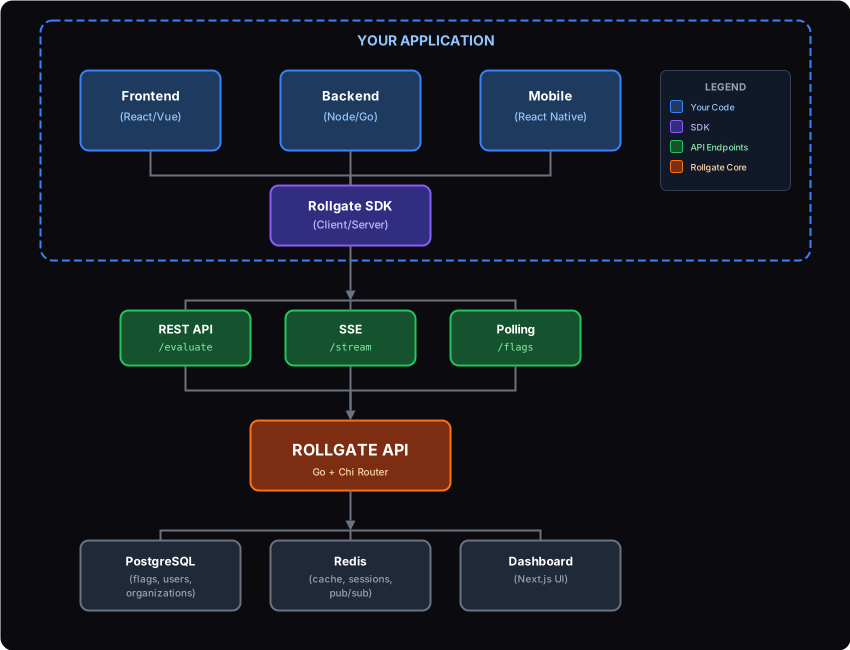
Core Components
Dashboard
Web interface for managing feature flags, built with Next.js.
- • Create and manage flags
- • Configure targeting rules
- • View analytics and audit logs
- • Manage team members and API keys
REST API
Core backend service handling all operations, built with Go.
- • Flag CRUD operations
- • User authentication (email, OAuth)
- • SDK endpoints for flag evaluation
- • Webhook triggers on flag changes
SDKs
Client libraries for integrating flags into your application.
- • React, Vue, Angular, Svelte, Browser (frontend)
- • Node.js, Go, Python, Java, .NET (backend)
- • React Native, Flutter (mobile)
- • Built-in caching and resilience
- • Real-time updates via SSE or polling
Data Layer
Persistent storage and caching for reliability and performance.
- • PostgreSQL: flags, users, organizations
- • Redis: caching, pub/sub for SSE
- • In-memory cache in SDK (stale-while-revalidate)
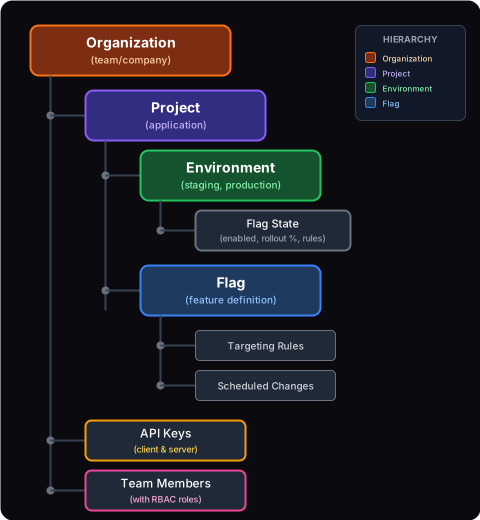
Data Model
Rollgate uses a hierarchical data model that mirrors how teams organize their work.
Key Design Decisions
- Flags are global to a project - The same flag key exists across all environments. Only the state (enabled, rollout) varies per environment.
- Environment-specific configuration - Each environment has its own flag states, allowing different settings for staging vs production.
- Soft deletes - Flags and users are soft-deleted to preserve audit history and allow recovery.
Flag Evaluation Flow
When your application checks a flag, here's what happens under the hood:
SDK Cache Check
The SDK first checks its local cache. If fresh data exists, it returns immediately (sub-millisecond latency).
API Request (if needed)
If cache is stale or empty, SDK calls GET /api/v1/sdk/flags with user context.
Server-Side Evaluation
API evaluates all flags for the user: checks enabled state, target users, targeting rules, and rollout percentage.
Response with ETag
API returns evaluated flags with an ETag header. SDK caches the response and uses ETag for conditional requests.
Real-time Updates
SSE connection or polling keeps flags in sync. When a flag changes, SDK updates cache and notifies your app.
Real-time Update Mechanisms
Server-Sent Events (SSE)
A persistent HTTP connection that receives flag updates in real-time.
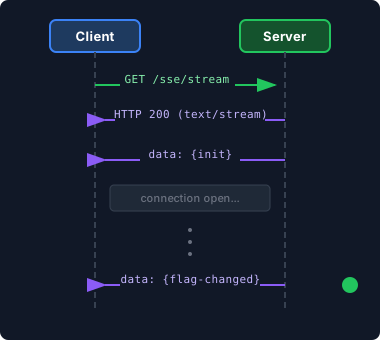
- + Instant updates (milliseconds)
- + Single connection, low overhead
- - May be blocked by some proxies
Polling
Periodic HTTP requests to check for flag updates (default: every 30 seconds).
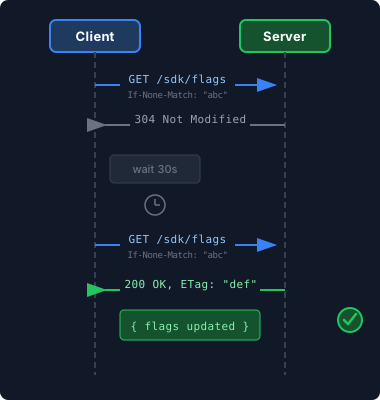
- + Works everywhere
- + Simpler to debug
- - Slight delay (up to polling interval)
Resilience Patterns
The SDK is designed to keep your application running even when Rollgate is unreachable.
Circuit Breaker
After 5 consecutive failures, the circuit opens and all flag checks use cached values.
Stale Cache
Even expired cache entries are kept as fallback. Better to serve stale data than fail.
Retry with Backoff
Failed requests are retried with exponential backoff (100ms, 200ms, 400ms...).
Failure Scenarios
| Scenario | SDK Behavior | User Impact |
|---|---|---|
| API timeout (single request) | Retry up to 3 times, use cache | None |
| API down (prolonged) | Circuit opens, use cached flags | Flags may be stale |
| First request fails (cold start) | Retry, then use default values | Defaults until recovered |
| Network blip during SSE | Auto-reconnect with backoff | Brief delay in updates |
Security Model
Authentication
- Dashboard: Session-based auth with HTTP-only cookies, OAuth (Google, GitHub)
- API (management): Session cookie or Bearer token
- SDK: API key in header (
X-API-Key)
API Key Types
- Client Key (
rg_client_*): Read-only, safe for frontend - Server Key (
rg_server_*): Full ruleset for local evaluation, backend only
RBAC Roles
| Role | Permissions |
|---|---|
| Owner | Full access, billing, delete organization |
| Admin | Manage flags, members, API keys, projects |
| Member | Create/edit flags, view audit logs |
| Viewer | Read-only access to flags and analytics |
Analytics Pipeline
Flag evaluation metrics flow from your application to the Rollgate dashboard.
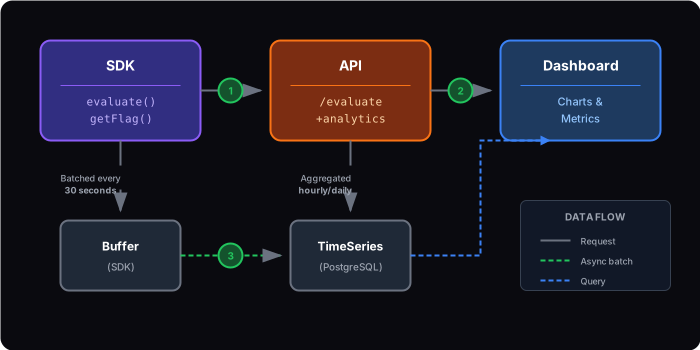
Metrics Collected
- • Flag evaluation count (per flag, per environment)
- • True/False distribution (for percentage rollouts)
- • SDK latency (p50, p95, p99)
- • Cache hit rate
- • Circuit breaker state transitions