Coming Soon
A/B Testing features are planned for a future release. The documentation below shows what's coming.
A/B Testing with Feature Flags
Use feature flags to run controlled experiments and measure the impact of changes on your product.
How A/B Testing Works
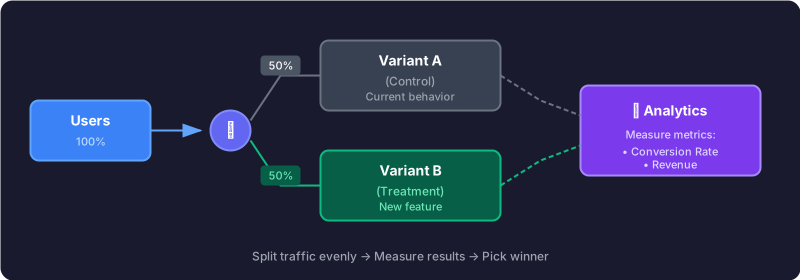
A/B testing (or split testing) involves showing different variations of a feature to different users and measuring which performs better.
Basic Example
Create a flag for your experiment and use percentage rollout to split traffic:
import { useFlag } from '@rollgate/sdk-react';

function CheckoutButton() {
  // 50% of users see the new checkout
  const showNewCheckout = useFlag('experiment-new-checkout', false);

  if (showNewCheckout) {
    return (
      <button
        onClick={() => {
          trackEvent('checkout_started', { variant: 'B' });
          startNewCheckout();
        }}
        className="bg-green-600 text-white px-6 py-3 rounded-lg"
      >
        Quick Checkout
      </button>
    );
  }

  return (
    <button
      onClick={() => {
        trackEvent('checkout_started', { variant: 'A' });
        startLegacyCheckout();
      }}
      className="bg-blue-600 text-white px-4 py-2 rounded"
    >
      Proceed to Checkout
    </button>
  );
}
Consistent Assignment
To ensure users always see the same variant, use user targeting with a consistent identifier:
import { RollgateProvider } from '@rollgate/sdk-react';

export default function Layout({ children }) {
  const user = useCurrentUser();

  return (
    <RollgateProvider
      apiKey="rg_client_..."
      user={user ? {
        id: user.id, // Consistent identifier
        attributes: {
          plan: user.plan,
          country: user.country,
        }
      } : undefined}
    >
      {children}
    </RollgateProvider>
  );
}
Tip: Users with the same ID will always get the same flag value, ensuring a consistent experience across sessions.
Analytics Integration
Connect your experiments to popular analytics platforms for measuring results:
Google Analytics 4
import { useFlag } from '@rollgate/sdk-react';

function useExperiment(flagKey: string) {
  const variant = useFlag(flagKey, false) ? 'treatment' : 'control';

  useEffect(() => {
    // Track experiment exposure
    gtag('event', 'experiment_viewed', {
      experiment_id: flagKey,
      variant_id: variant,
    });
  }, [flagKey, variant]);

  return variant;
}

// Track conversion
function trackConversion(flagKey: string, variant: string) {
  gtag('event', 'purchase', {
    experiment_id: flagKey,
    variant_id: variant,
    value: orderTotal,
    currency: 'EUR',
  });
}
Mixpanel / Amplitude
import mixpanel from 'mixpanel-browser';
import { useFlag } from '@rollgate/sdk-react';

function useExperiment(flagKey: string) {
  const isEnabled = useFlag(flagKey, false);
  const variant = isEnabled ? 'B' : 'A';

  useEffect(() => {
    // Set user property for segmentation
    mixpanel.people.set({
      [`experiment_${flagKey}`]: variant,
    });

    // Track exposure event
    mixpanel.track('Experiment Viewed', {
      experiment: flagKey,
      variant,
    });
  }, [flagKey, variant]);

  return { variant, isEnabled };
}
Segment
import { useFlag } from '@rollgate/sdk-react';
import { AnalyticsBrowser } from '@segment/analytics-next';

const analytics = AnalyticsBrowser.load({ writeKey: '...' });

function trackExperiment(flagKey: string, variant: 'A' | 'B') {
  analytics.track('Experiment Viewed', {
    experimentId: flagKey,
    variantId: variant,
  });
}

function trackConversion(flagKey: string, variant: 'A' | 'B', revenue: number) {
  analytics.track('Order Completed', {
    experimentId: flagKey,
    variantId: variant,
    revenue,
  });
}
Real-World Example: Pricing Page Optimization
Scenario
A SaaS company wants to test whether showing annual pricing by default (instead of monthly) increases subscription revenue. They need statistical confidence before committing to the change.
Experiment Setup
- • Flag:
pricing-annual-default - • Control (A): Monthly pricing shown by default (current behavior)
- • Treatment (B): Annual pricing shown by default
- • Split: 50/50 using percentage rollout
- • Primary metric: Revenue per visitor
- • Duration: 2 weeks (10K visitors per variant)
Results after 2 weeks
| Metric | Control (A) | Treatment (B) | Lift |
|---|---|---|---|
| Visitors | 10,234 | 10,198 | - |
| Conversions | 412 (4.03%) | 389 (3.81%) | -5.4% |
| Revenue/visitor | €3.21 | €4.87 | +51.7% |
Decision
Despite slightly lower conversion rate, revenue per visitor increased by 51.7% (statistically significant, p < 0.01). The annual default was rolled out to 100% of users, increasing MRR by €18K/month.
Statistical Significance
Before declaring a winner, ensure your results are statistically significant:
- • Sample size: Minimum 1,000 conversions per variant for reliable results
- • Confidence level:Target 95% confidence (p < 0.05) before making decisions
- • Duration: Run for at least 1-2 full business cycles (weekday + weekend traffic)
- • Tools: Use calculators like Evan Miller's A/B Test Calculator
Best Practices
1. Define Success Metrics First
Before starting, decide what you're measuring (conversion rate, engagement, revenue).
2. Run for Sufficient Duration
Wait for statistical significance. Usually 1-2 weeks minimum depending on traffic.
3. Test One Thing at a Time
Avoid testing multiple changes simultaneously to isolate the impact.
4. Document Your Experiments
Keep records of hypotheses, results, and learnings for future reference.