Proxy Pattern
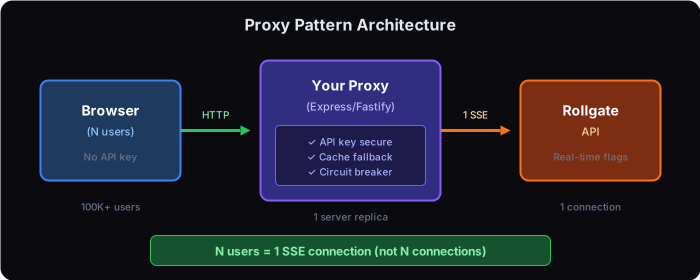
Scale to millions of frontend users with a single SSE connection per server replica. Keep your API key secure and get real-time updates without per-user connections.
Why Use This Pattern?
🛡 Security
Server API key never exposed to clients. Frontend uses your proxy, not Rollgate directly.
📈 Scalability
3 replicas = 3 SSE connections. 100K users = still only 3 connections.
💾 Resilience
Built-in caching means your app works even if Rollgate is temporarily unavailable.
💰 Cost Effective
A ~6/month server handles 10K+ requests/second with this pattern.
Real-World Example: SaaS Platform with 2M Users
Scenario
A B2B SaaS platform serves 2 million monthly active users across 500+ enterprise clients. They use feature flags for gradual rollouts, A/B testing, and per-client feature customization.
Problem
Direct SDK connections from 2M users would require 2M SSE connections or massive polling load. This would cost $$$$ with most feature flag providers (MTU-based pricing) and strain their infrastructure.
Solution
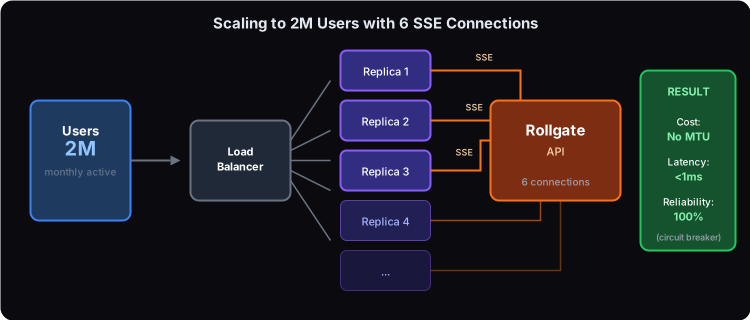
Deploy the proxy pattern with 6 backend replicas behind a load balancer. Each replica maintains one SSE connection to Rollgate. Total: 6 connections serve 2M users.
Result
- ✓ Cost: No per-user pricing. Pay for what you use, not how many users you have.
- ✓ Latency: Sub-millisecond flag checks (in-memory cache)
- ✓ Reliability: Circuit breaker ensures 100% uptime even during Rollgate maintenance
- ✓ Security: Server API key never exposed to clients
Tested Performance
| Metric | SSE Direct | Polling |
|---|---|---|
| Concurrent connections | 70,000+ | 10,000 VUs |
| Error rate | 0% | 0% |
| API Memory | ~470 MiB | ~658 MiB |
| Throughput | Real-time push | 4,629 req/s |
Implementation
1. Create the Proxy Server
import express from 'express';
import cors from 'cors';
import { RollgateClient } from '@rollgate/sdk-node';

const PORT = process.env.PORT || 3001;

// Single Rollgate connection for all users
const rollgate = new RollgateClient({
  apiKey: process.env.ROLLGATE_API_KEY!,
  baseUrl: process.env.ROLLGATE_BASE_URL || 'https://api.rollgate.io',
  enableStreaming: true, // Use SSE for real-time
  refreshInterval: 30000, // Fallback polling
});

const app = express();
app.use(cors());
app.use(express.json());

// Get all flags (cached from SSE)
app.get('/api/flags', (req, res) => {
  res.json({
    flags: rollgate.getAllFlags(),
    _meta: { cachedAt: new Date().toISOString() },
  });
});

// Check single flag
app.get('/api/flags/:key', (req, res) => {
  const enabled = rollgate.isEnabled(req.params.key, false);
  res.json({ key: req.params.key, enabled });
});

// SSE endpoint for real-time updates to clients
const sseClients = new Set();
app.get('/api/stream', (req, res) => {
  res.set({
    'Content-Type': 'text/event-stream',
    'Cache-Control': 'no-cache',
    'Connection': 'keep-alive',
  });
  res.flushHeaders();

  // Send initial flags
  res.write(`event: flags\ndata: ${JSON.stringify(rollgate.getAllFlags())}\n\n`);
  sseClients.add(res);

  req.on('close', () => sseClients.delete(res));
});

// Broadcast updates when flags change
rollgate.on('flags-updated', (flags) => {
  const data = `event: flags\ndata: ${JSON.stringify(flags)}\n\n`;
  sseClients.forEach(client => client.write(data));
});

// Health check with circuit breaker status
app.get('/api/health', (req, res) => {
  const circuitState = rollgate.getCircuitState();
  res.json({
    status: circuitState === 'open' ? 'degraded' : 'healthy',
    circuit: circuitState,
    cache: rollgate.getCacheStats(),
  });
});

// Prometheus metrics
app.get('/api/metrics', (req, res) => {
  res.set('Content-Type', 'text/plain');
  res.send(rollgate.getPrometheusMetrics('rollgate_proxy'));
});

// Start server
async function start() {
  await rollgate.init();

  rollgate.on('flags-updated', (flags) => {
    console.log('[Proxy] Flags updated:', Object.keys(flags).length);
  });

  app.listen(PORT, () => {
    console.log(`[Proxy] Running on port ${PORT}`);
  });
}

start();
2. Use from Frontend
Choose between polling (simple) or SSE (real-time) for your frontend:
Option A: Polling (Simple)
function useFlags() {
  const [flags, setFlags] = useState({});

  useEffect(() => {
    fetch('/api/flags')
      .then(res => res.json())
      .then(data => setFlags(data.flags));
  }, []);

  return flags;
}
Option B: SSE (Real-time updates)
function useFlags() {
  const [flags, setFlags] = useState({});

  useEffect(() => {
    const eventSource = new EventSource('/api/stream');

    eventSource.addEventListener('flags', (e) => {
      setFlags(JSON.parse(e.data));
    });

    return () => eventSource.close();
  }, []);

  return flags;
}function App() {
const flags = useFlags();
if (flags['new-checkout']) {
return <NewCheckout />;
}
return <OldCheckout />;
}3. Docker Deployment
version: "3.8"

services:
  rollgate-proxy:
    build: .
    ports:
      - "3001:3001"
    environment:
      - ROLLGATE_API_KEY=${ROLLGATE_API_KEY}
      - ROLLGATE_BASE_URL=https://api.rollgate.io
    restart: unless-stopped
    healthcheck:
      test: ["CMD", "wget", "-qO-", "http://localhost:3001/api/health"]
      interval: 30s
      timeout: 3s